You may have noticed things have been quiet on the SafeZONE front lately — I’ve taken a bit of a break from that development, but an update is coming, so watch this space. In the meantime, I’ve been keeping busy with something a little different.
If you’re a musician, you’ve probably been here: you’re mid-practice, you need a metronome, you grab the first free app you find, and within thirty seconds there’s a banner ad plastered across the beat display and a paywall blocking the time signature you actually need.
I got fed up with that. So I built iMentronome.
What it is
iMentronome is a precision metronome and music toolkit for iPhone and Apple Watch. It’s free — no ads, no subscriptions, no in-app purchases — and I intend to keep it that way. It started as something I built for myself, but it grew into something I’m genuinely proud of, so here we are.
What it does
At its core it’s a high-precision timer running from 40 to 240 BPM across nine time signatures — your standards like 4/4 and 3/4, but also 5/4, 7/8, 9/8, 12/8 and more. Tap Tempo is built in: tap the button a few times and the app averages your last four intervals to set the BPM by feel. The click keeps going when you switch apps or lock your phone, and the screen stays awake while it’s running so you don’t lose your beat mid-take.
Auto-Detect
This is the one I find myself using surprisingly often. Hold your phone near any music, tap Listen, and iMentronome analyses the audio through the mic to estimate the tempo and time signature. It returns a carousel of the most plausible candidates — because sometimes a track could sit at 120 or 60 depending on how you feel it — and you pick the one that fits. Works well for figuring out the tempo of a recording or locking into a track before you start playing over it.
Play Along / Drift Meter
If you want to know whether you’re actually in time, this is the feature to use. Play along to the metronome while the app listens back through the mic, and a live drift meter shows you your actual BPM against the target — colour-coded so you can see at a glance whether you’re rushing, dragging, or locked in. It’s humbling in the best way.
Guitar Tuner
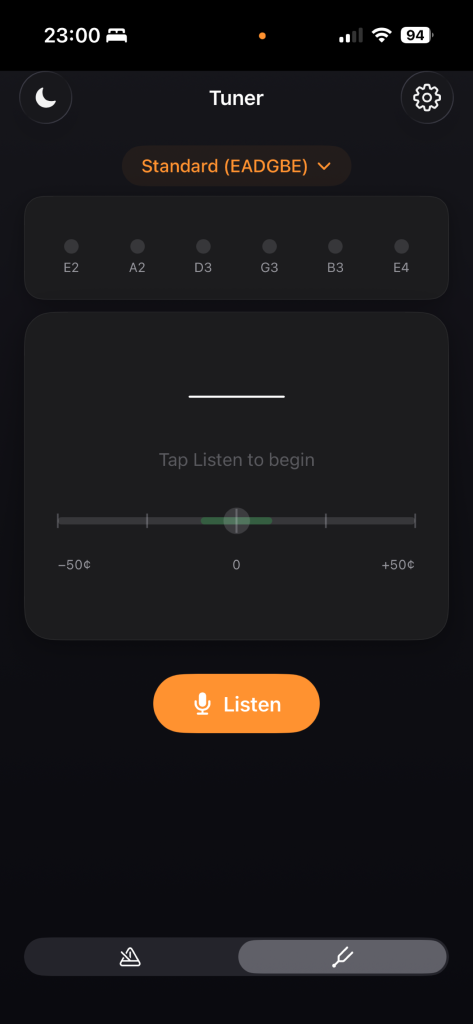
The tuner lives on the second tab and uses FFT-based pitch detection across eleven presets: standard 6-string tunings plus Drop D, Eb, D Standard, Drop C, Open G, Open D, Open E, DADGAD, and a few 12-string variations. An animated needle shows you cents deviation so you can tune accurately without squinting at a number. Low-string detection works reliably — the app checks sub-harmonic frequencies to find the fundamental even on a low E or B, which cheaper tuners often struggle with.
Stage Monitor
A slightly unusual one. Tap Monitor and iMentronome passes your iPhone mic straight through to your headphones in real time, with a 3-band EQ (low shelf, parametric mid, high shelf) and an input gain control. It’s basically a pocket in-ear monitor — useful for hearing yourself alongside a backing track, or for checking how your acoustic instrument sounds in a room without setting up a full rig. It uses the built-in mic even if you’re connected via Bluetooth, which keeps the latency sensible.
Apple Watch
The app has a full watchOS companion. Beat 1 triggers a strong haptic, every other beat a lighter tap — handy when you can’t hear the click. You can start, stop, adjust BPM via the Digital Crown, and change time signature from your wrist. State syncs instantly between phone and watch.
The “free forever” bit
I have no interest in monetising this with ads or subscriptions. The app has a one-time welcome screen when you first open the tuner that explains the philosophy and drops an optional Buy Me a Coffee link — that’s the extent of it. If you find iMentronome useful, the coffee is genuinely appreciated but absolutely not expected.
Try it now
iMentronome is currently in TestFlight beta. If you want to give it a go, you can join here:
Feedback is very welcome — tap the feedback button in TestFlight or drop me a message. I’d love to know how it holds up in real-world use.
Built by a musician, for musicians. Hope it helps.
Be First to Comment